
Write Skills Like Workstations, Not Prompts


Anthropic published a post this week on how they use Claude Code Skills internally. Hundreds of skills in production. Nine categories. A set of hard-won tips from real usage.
It's good. You should read it. But I think it undersells the most important idea buried inside it.
Skills aren't prompt engineering. They're context engineering™. And once you see them that way, most of the "tips" in Anthropic's post stop being tips and start being obvious consequences of a single principle: you're designing the information architecture that an agent navigates at runtime.
Let me explain what I mean.
Skills are custom instruction sets you give to Claude Code. At their simplest, a markdown file in
.claude/skills/ that tells Claude how to handle a specific type of task. At their most powerful, a folder containing markdown, scripts, reference data, templates, and config files that Claude discovers and uses at runtime. Think of them as reusable context packages. You write them once, Claude loads them when they match a request, and they shape how it works across your codebase.Most engineers treat skills like instructions. Write some markdown. Tell Claude what to do. Drop it in .claude/. Done.
Anthropic's post makes a different claim. Skills are folders. They contain scripts, reference data, templates, config files, example outputs. The agent discovers what's in the folder and reads what it needs, when it needs it.
This is progressive disclosure. You're not stuffing everything into a single prompt. You're building a file system that the agent navigates. Point it to a references/api.md for detailed function signatures. Put template files in assets/ for it to copy. Split gotchas into their own file so they don't dilute the main instructions.
If you've been following what I've been writing about context engineering, this should sound familiar. The folder structure is the context strategy. You're managing the model's attention budget across multiple files instead of cramming everything into one.
Here's what a well-structured skill actually looks like:
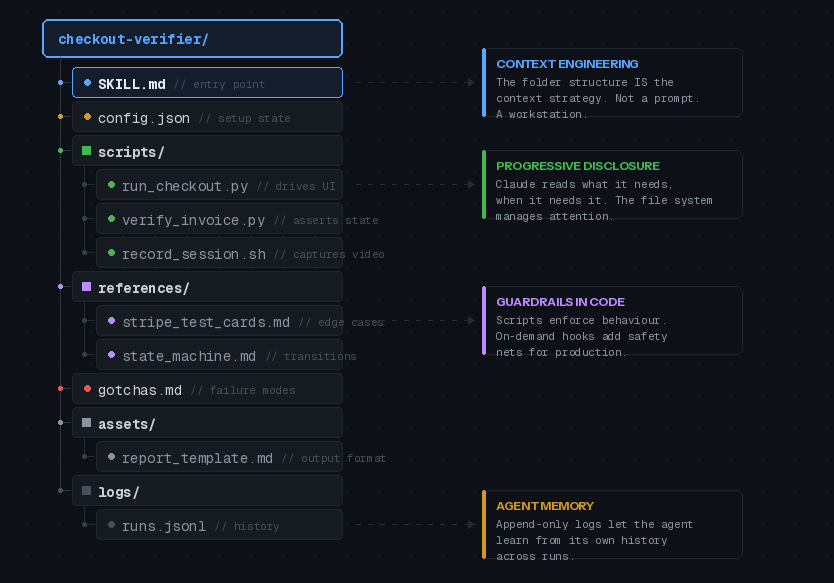
Notice what's happening. The SKILL.md doesn't contain everything. It contains the goal, the trigger condition, and a map to everything else. Claude reads the map, then pulls in the specific files it needs for the current task. The scripts do the heavy lifting. The references provide context without bloating the main prompt. The gotchas file captures failure modes over time.
That's not a markdown file with instructions. That's a workstation.
Ideas Worth Stealing
The original post has a long tips section. Most of it is solid but unsurprising. Three ideas stood out as genuinely non-obvious.
Verification skills deserve a disproportionate investment
Anthropic says it can be worth having an engineer spend a full week just making your verification skills excellent. I'd go further.
Verification skills are the evaluation loop for agent output. Without them you're eyeballing every result, which doesn't scale. With them you get programmatic assertions on what Claude actually produced.
Consider the techniques they mention: having Claude record video of its test run so you can see exactly what it tested. Enforcing state assertions at each step of a multi-step flow. Including a variety of scripts in the skill so Claude can pick the right verification approach for the situation.
If you've been thinking about evaluation-driven development, verification skills are where that idea meets Claude Code in practice. They close the loop. If you only invest in one type of skill, make it verification.
Give Claude code, not just words
Including scripts and libraries in your skill changes what the model spends its turns on. Instead of reconstructing boilerplate from scratch, it composes existing functions.
Anthropic's example: a data science skill with a library of fetch functions. Claude imports them, composes them into analysis scripts on the fly, and focuses on the actual analysis question rather than figuring out how to connect to your event source.
This maps to something I keep seeing in production agent systems. The more pre-built components you give an agent, the more it can focus on orchestration and decision-making rather than generation. Same principle that makes tool-use agents more reliable than pure-generation agents. Give the agent the right building blocks and it makes better decisions about how to assemble them.
On-demand hooks as safety guardrails
Skills can register hooks that activate only when the skill is called and last for the session. This is more powerful than it sounds.
The /careful hook blocks rm -rf, DROP TABLE, force-push, and kubectl delete via a PreToolUse matcher. You activate it when you're touching prod. Having it always on would make normal development painful, but having it available when you need it is a genuine safety net.
The /freeze hook blocks edits outside a specific directory. Useful when you're debugging and want to add logs without Claude "fixing" unrelated code.
These are the kind of guardrails that matter in regulated environments. In defence and financial services, you can't have an agent with unconstrained write access to production systems. On-demand hooks give you the control surface without the constant friction.
A few gaps worth noting.
When should you NOT build a skill? The post mentions that "it can be quite easy to create bad or redundant skills" but doesn't go deeper. In my experience, the failure mode is skills that duplicate what Claude already knows. If your skill is mostly restating default behaviour, it's adding context overhead for no gain. Every skill checked into a repo adds to the model's context at session start. That cost is real.
Dependency management doesn't exist yet. You can reference other skills by name and hope they're installed. That's it. For composing complex workflows across multiple skills, this is a real limitation. The post acknowledges this but waves it past.
Measuring skill effectiveness. Anthropic uses a PreToolUse hook to log skill usage across the company. They can find skills that are popular and skills that are under triggering. If you're running skills at any scale, you need this kind of observability. The post mentions it in one sentence. It deserves a full section.
Distribution
Two paths. For small teams: check skills into your repo under .claude/skills. For larger orgs: run an internal plugin marketplace where engineers submit skills to a sandbox, get organic adoption, then PR them into the marketplace when they have traction.
The marketplace model Anthropic describes is sensibly lightweight. No centralised approval team. Organic discovery. Curation by traction. Worth copying if you're past a handful of repos.
So What
Skills are the first real pattern for packaging context, scripts, and guardrails into composable units for a coding agent. The tooling is still basic. But the core idea is right: treat the agent like a team member who needs a well-organised workstation, not a chatbot who needs a better prompt.
Anthropic's post is the best reference I've seen for what that looks like in practice. The original is here with all the code examples and screenshots.
No spam, no sharing to third party. Only you and me.
Member discussion