
Fitting LLMs on Self-Hosted GPUs



Every time I deploy a new model, the same question comes up first: does it fit on the hardware we have? Not the choice of runtime, not the right GPU, not how to tune batching, just whether it'll run without OOM1ing in the first hour.
You can skip the maths by looking at the parameter count, eyeballing it against a vague memory of how big an H200 is, and figuring it'll sort itself out in staging. That's how you spend a week sorting it out in staging.
I wanted to clear the question in five minutes instead of five days. So I worked through Baseten's Inference Engineering and built a calculator on top of one back-of-envelope formula. This post walks through the formula, the three places it bends, and the checklist I run before I propose GPU requirements.
How GPU inference works
A short mental model before the formula, because the formula won't make sense without it.
Model weights are the trained parameters of the network, and to run the model those weights have to be physically resident in GPU memory (VRAM). The CPU's RAM is too slow and too far away. If the weights don't fit in VRAM, the model won't load.
LLM inference happens in two phases.
- Prefill processes the input prompt all at once, doing lots of maths on the same weights, so it's compute-bound.
- Decode generates the response one token at a time, each token conditioned on everything before it. In dense decode, each generated token requires repeatedly streaming the model weights through the GPU memory hierarchy, which is why decode is often bandwidth-bound. Decode isn't bottlenecked on maths; it's bottlenecked on how fast the GPU can pull weights through memory. That speed is HBM3 bandwidth, measured in TB/s.
Batching is what makes this economical. If ten users each want their next token, the GPU reads the weights once and does ten matmuls in parallel. An eleventh user is nearly free. Serious production serving rarely generates for one user at a time.
The other big thing in VRAM is the KV cache. Attention looks back at all previous tokens, and the KV cache stores their attention state so we don't recompute it on every step. The cache grows with batch size and sequence length, and it sits alongside the weights.
Capacity planning is mostly a question of what fits in VRAM. Throughput planning is mostly a question of how fast the GPU can read VRAM.
The formula
Almost everything in capacity planning collapses to one line:
vram_required = (bits_precision / 8) × params_billions × kv_cache_allocationbits_precision / 8 is bytes per parameter at storage precision (FP16 is 2, FP8 is 1, FP4 family is 0.5).
params_billions is parameter count in billions. For MoE models in batched serving, use the total count, not the active count (more on that below).
kv_cache_allocation is the multiplier on top of weights for everything else in VRAM: KV cache, activations, paged-attention block tables, framework overhead, and a margin for tail events.
This is a sizing estimate, not a benchmark. I aim for within 10% of what real serving consumes. Off by 30% means I mis-provisioned. Off by 5% means I got lucky with my runtime defaults.
Simulate LLM VRAM usage
Storage precision
When a model doesn't fit, my first move is to drop a precision tier. Each step down halves bytes per parameter, and that compounds with the multiplier.
Llama 3 70B is the cleanest example. At FP16 the weights alone are 140 GB. At FP8 they drop to 70 GB. At FP4 they collapse to 35 GB. Apply the default 1.5x multiplier and you go from 210 GB (four H100s), to 105 GB (two H100s), to 52.5 GB (one H100, with room to spare).
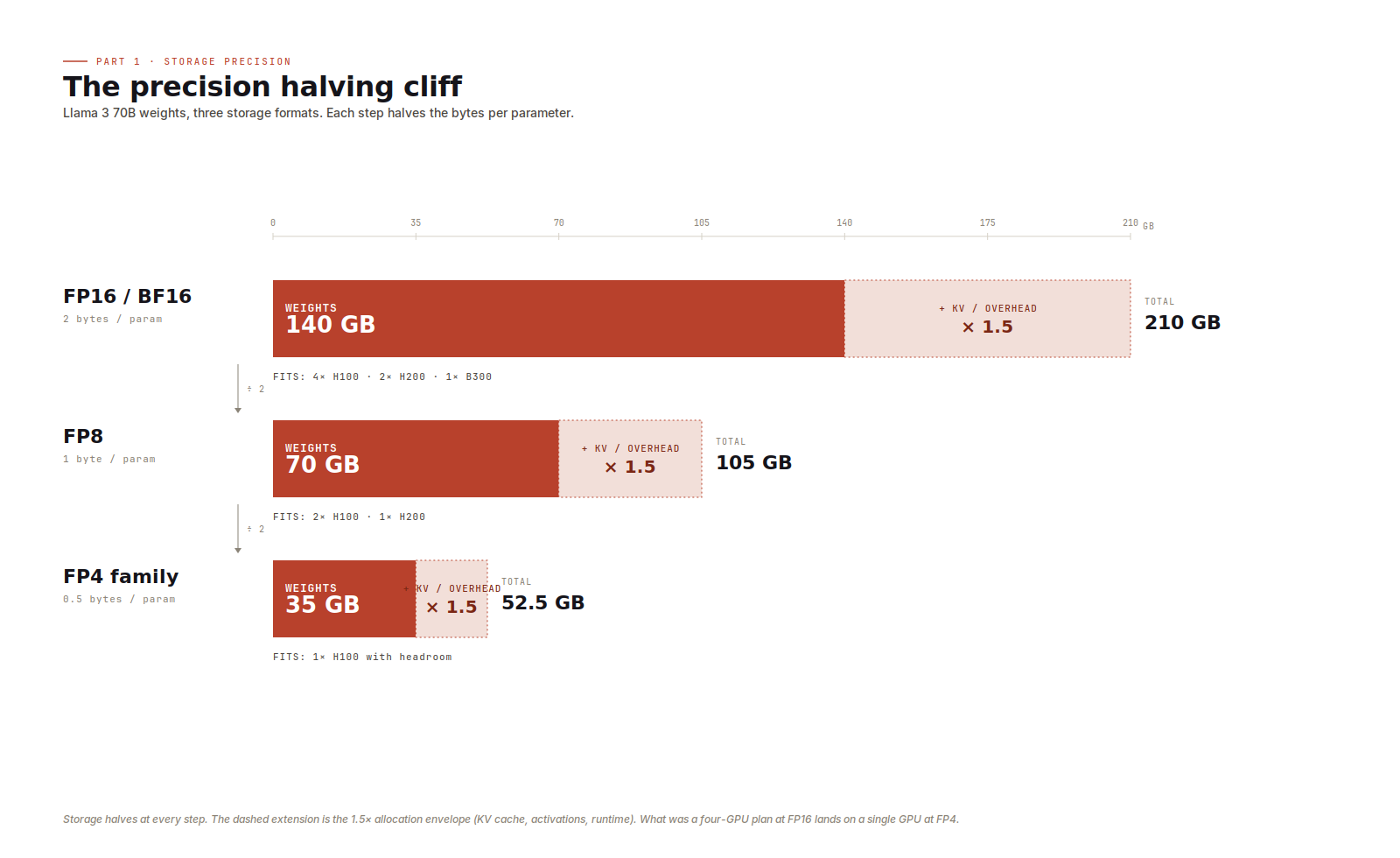
Two things tripped me up early. First, BF16 and FP16 are the same size. The difference between them is dynamic range, not bytes. Modern training stacks emit BF16 by default, but for sizing it's still 2 bytes per parameter. Second, the 4-bit family looks uniform but isn't quite. FP4, MXFP4, NVFP4, and INT4 all cost 0.5 bytes per parameter, so for sizing they're interchangeable. The maths underneath differs (block scales, microscaling, exponent/mantissa splits, integer arithmetic), but that affects throughput, not sizing.
When a model barely fits at the precision its model card recommends, dropping a tier is usually the cleanest move. Most production teams ship 70B-class models in FP8 today, and the larger MoE models increasingly ship in MXFP4.
What the multiplier covers
The 1.5x, 1.8x, and 2.5x options are budget envelopes for everything that isn't weights.
The dominant component is KV cache.
At long context or large batch KV cache becomes the main cost. Llama 3 70B has 80 layers, 8 KV heads, and a head dimension of 128, so each token costs about 0.31 MB of KV cache at FP16. At an 8k sequence length and batch size 8, that's roughly 20 GB of KV cache alone, or about 10 GB if the runtime stores the cache in FP8. Push to 32k context or batch 32 and the cache dwarfs the weights. Activations, the forward-pass intermediates that live for one step, sit alongside it. Then there's runtime overhead: paged-attention block tables, allocator behaviour, CUDA graph buffers, framework working memory. Each piece is small in absolute terms, but together they're real. The rest of the envelope is safety margin for tail requests.
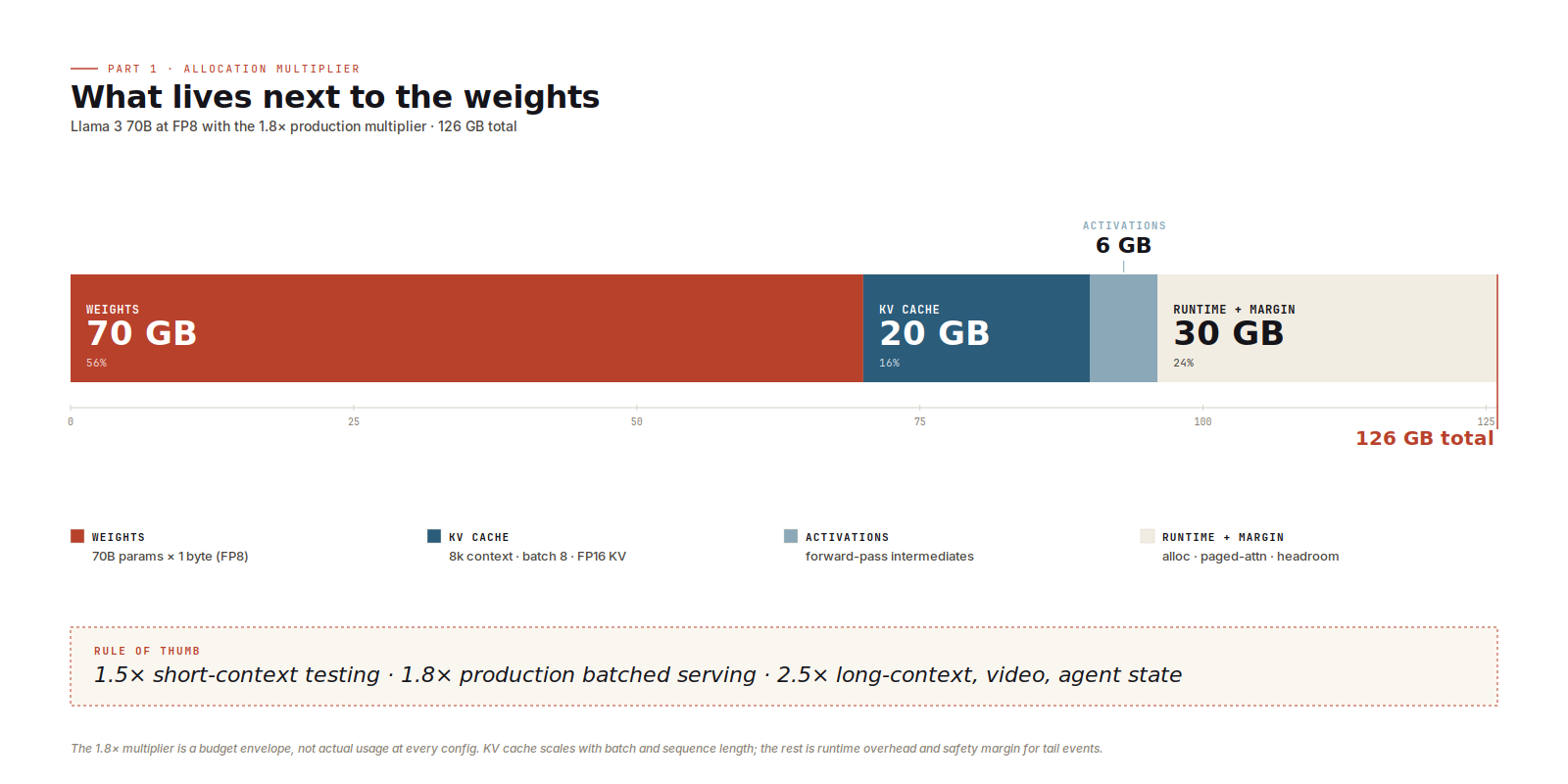
I default to 1.5x for short-context single-stream work, the kind of thing that's fine for benchmarking and local testing but won't survive production. 1.8x is what I reach for first on production batched chat-style serving. 2.5x is for long-context heavy workloads: 32k+ contexts, video or speech generation, agent loops where every turn pushes more KV.
This is also where vLLM and SGLang earn their keep. Both use paged KV cache to stop this allocation from fragmenting under variable-length requests. If you provisioned for the average case but the runtime fragments against the worst, you'll OOM at peak while the dashboards still look fine.
Mixture of experts
MoE sizing is tricky and requires a more nuanced analysis.
DeepSeek V3.1 has 671B parameters total, 37B active per token. The 37B sets a rough upper bound on per-token compute. The 671B drives what you load into VRAM in batched server inference, because over a steady stream of requests the experts all get hit, so they all need to be resident. Sizing on active params (37B at FP8 ≈ 37 GB) gets you a one-H100 plan that looks great in a slide deck and falls over in production. Sizing on total params (671 GB at FP8, 1208 GB with the 1.8x multiplier) lands on an 8×B200 instance, which is the honest answer.
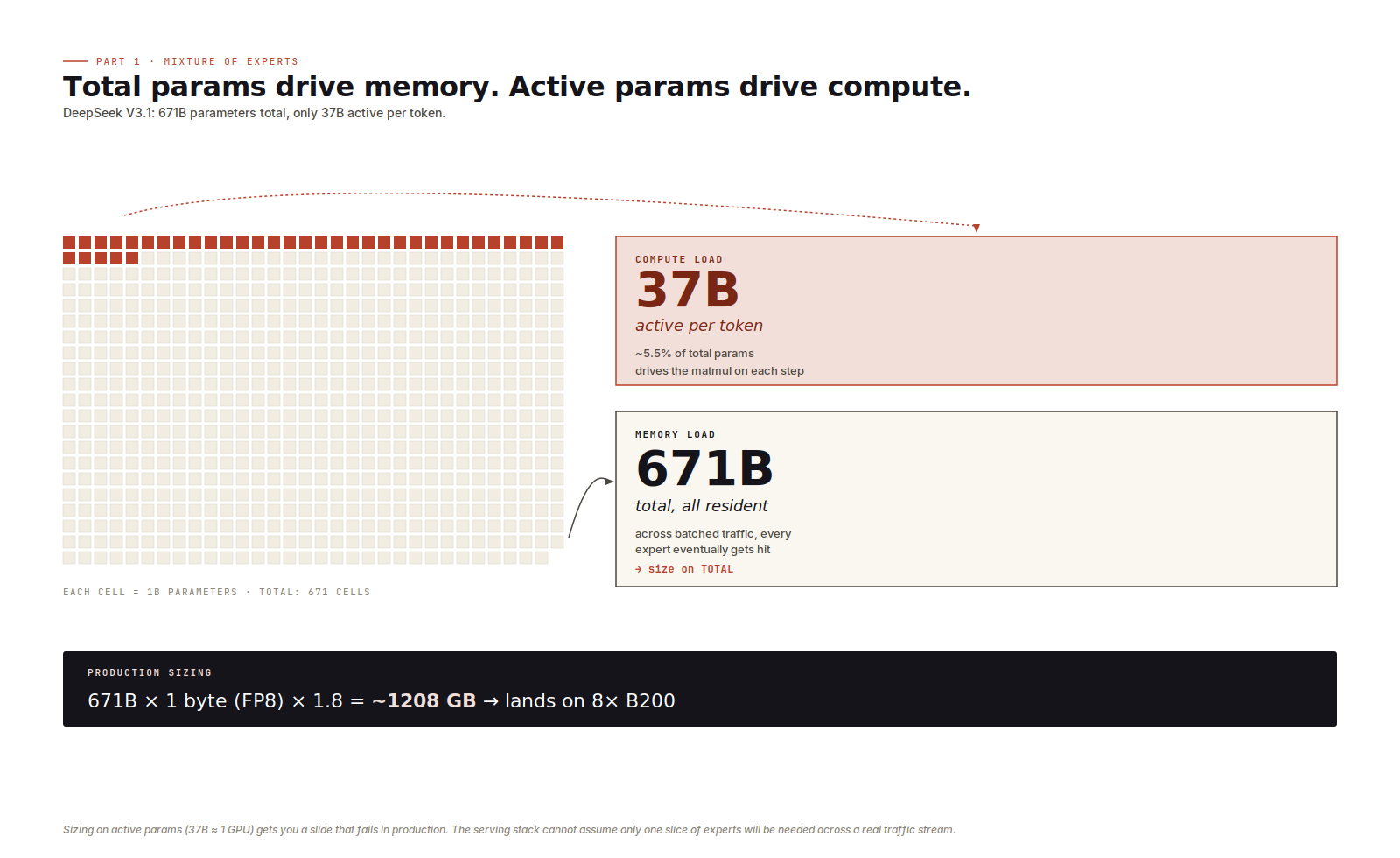
There is one exception. Single-request local inference with explicit expert offloading, where inactive experts sit in CPU memory and get swapped to the GPU on demand, makes active-params meaningful again. You're trading GPU VRAM for PCIe latency, which is its own engineering problem and not what production serving looks like. For server inference, active parameters drive compute and total parameters drive memory.
Step ladders
Real provisioning is rarely "I need 200 GB." It's "I need to land on 1×, 2×, 4×, or 8× of one SKU." You are packing a model into one of a handful of fixed-size boxes, and the boxes are whatever cloud providers and on-prem cluster designers happen to sell.
The ladders that matter for 2026 inference: H100 at 80, 160, 320, or 640 GB; H200 at 141, 282, 564, or 1128 GB; B200 at 192, 384, 768, or 1536 GB; B300 at 288, 576, 1152, or 2304 GB. Round up; you almost never hit a rung exactly. The gap between rungs is where money disappears.
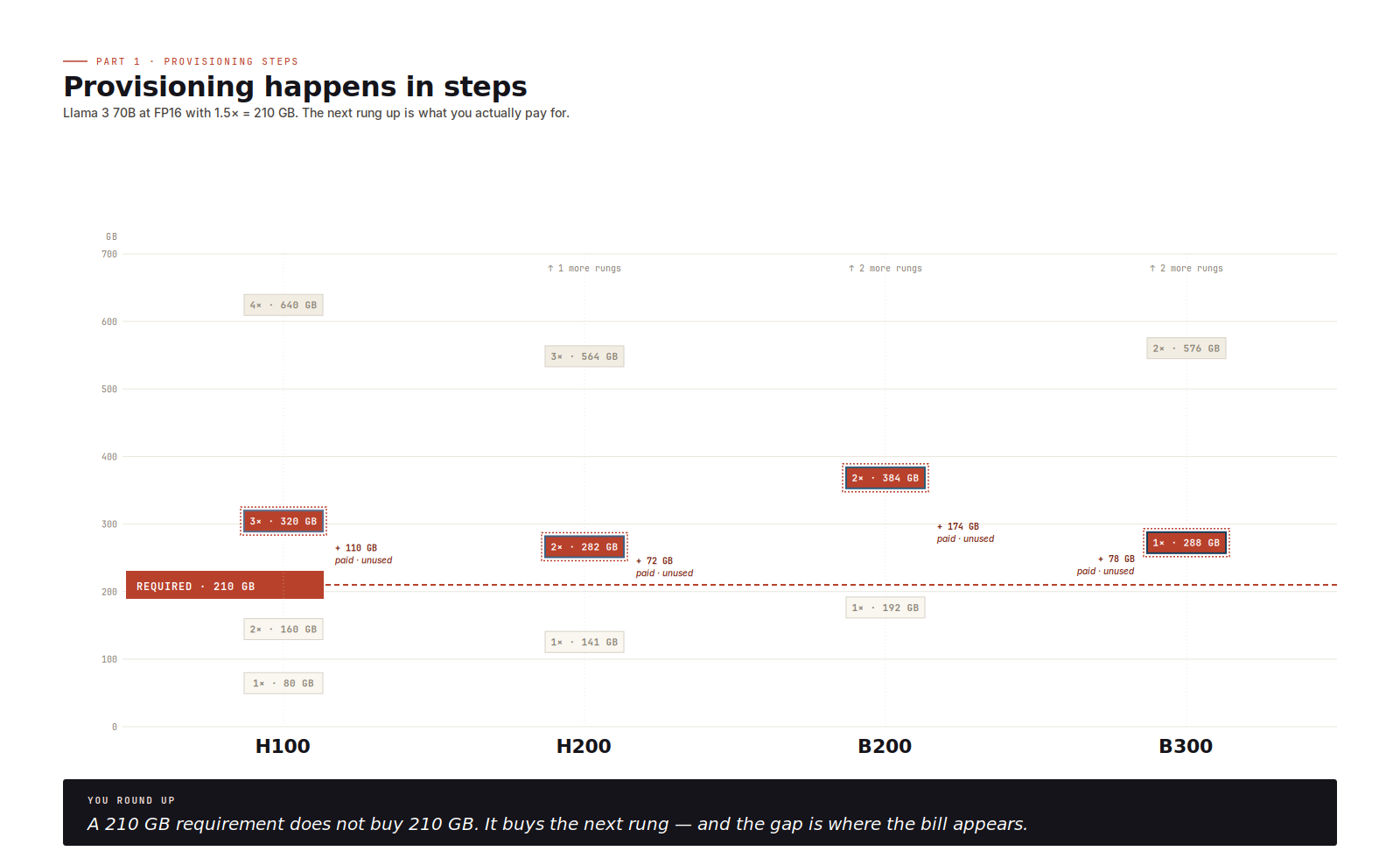
Know the ladder before specifying the model, or you quietly buy twice the hardware you needed.
Embedding models
Embedding models change the formula. They don't carry an autoregressive KV cache, so the multiplier collapses toward 1.0, leaving weights plus a slice of activation memory.
BGE-M3 at 0.6B parameters and FP16 occupies 1.2 GB. NV-Embed v2 at 7.85B parameters and FP16 lands at about 16 GB. Both fit on the smallest data-centre accelerators (L4, A10) with significant headroom
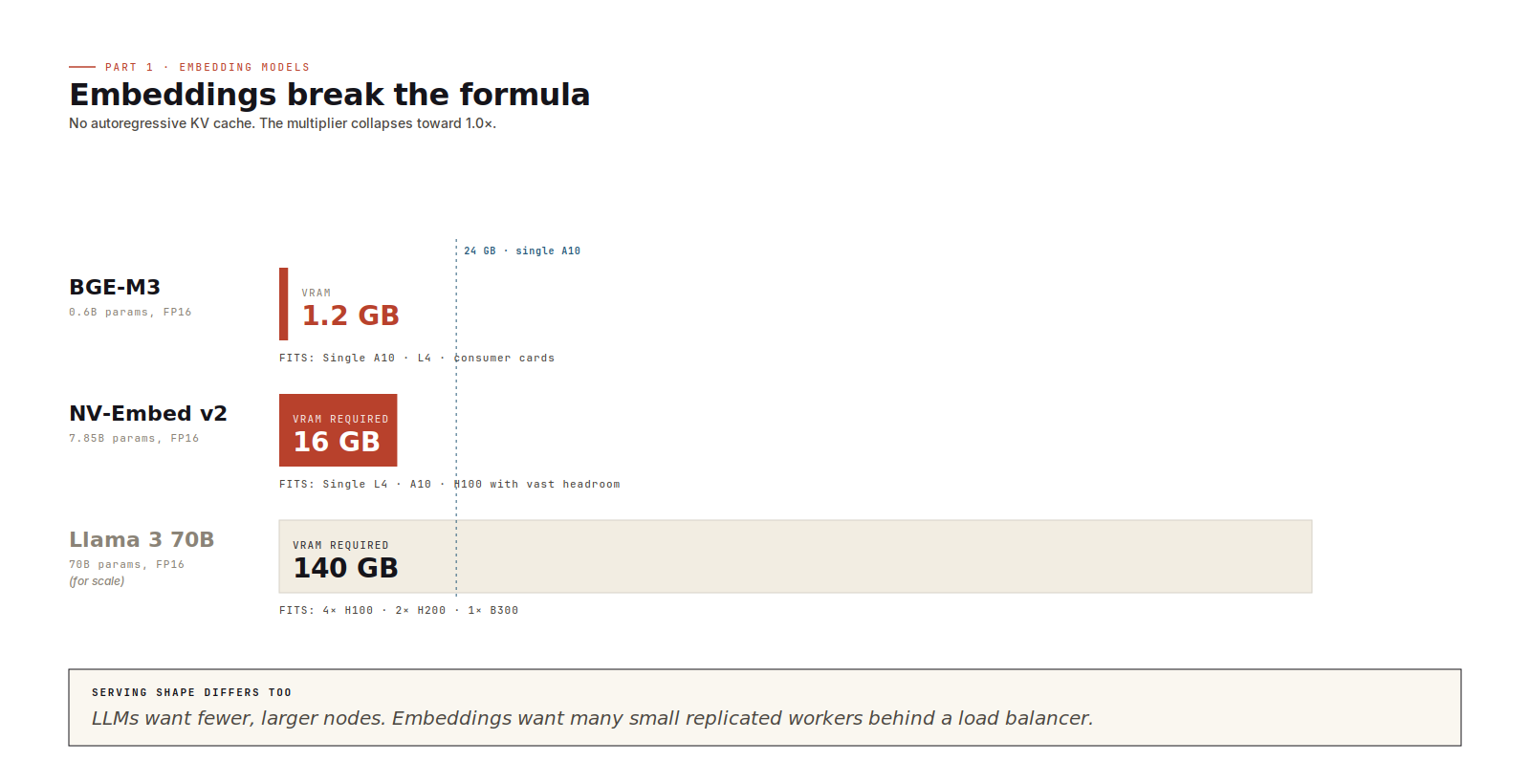
The provisioning shape is wide and shallow. Many small accelerators, each running a replicated stateless worker, batching aggressively at the millisecond level. The instinct from LLM serving (consolidate onto fewer, larger nodes) is wrong here. Part 2 covers why.
Sizing checklist
Before I propose GPU requirements I run six checks.
- Bytes per parameter, set by storage precision (FP16/BF16 = 2, FP8 = 1, FP4 family = 0.5).
- Total parameters in billions; for MoE in server inference, total, not active.
- A workload multiplier (1.5x for short-context, 1.8x for production batching, 2.5x for long-context or heavy KV).
- Multiply the three.
- Round up to the next step-ladder rung on the target SKU. Confirm the precision is supported on that SKU, native or via runtime dequantisation.
- Leave 10 to 15% margin for runtime variance, long-context tails, and traffic spikes.
Those six checks are enough for a first-pass feasibility estimate. Final capacity planning still needs a runtime-specific load test.
This post covers the capacity question. It will not tell you whether the model is fast enough, cheap enough, or operationally pleasant to serve. But it will tell you whether the deployment is physically plausible, which is the first gate every serving plan has to pass.
Throughput is the second gate. Part 2 of this series works through it: decode versus prefill, why HBM bandwidth often matters more than peak FLOPs, where the runtime earns its keep, and how to pick a GPU that matches the shape of your workload rather than the headline on its spec sheet. If Part 1 was about whether the model can run, Part 2 is about whether it can serve.
1 OOM - Out of Memory.
2 matmul is matrix multiplication, the core operation in transformer attention and feed-forward layers.
3 HBM (High Bandwidth Memory) provides exceptionally high data transfer rates, designed for AI, graphics, and high-performance computing by stacking DRAM dies vertically.
No spam, no sharing to third party. Only you and me.




Member discussion